


BEHIND-THE-SCENES
THE WORKFLOW BEHIND "SHOOT43"
SHOOT43 used to be focused on using 3 cameras to quickly create a multicam video production...but when I realized that shooting in a 4:3 aspect ratio was a big part of the workflow too, I kind of rolled that into the name as well...but we'll see if this method sticks.
SHOOT ORIGINALS IN 4:3

ABOVE: Ok, I will admit, I started testing the 4:3 aspect ratio when I was using Micro Four Thirds cropped sensor cameras exclusively. Now, I'm trying to make this work on a full-frame sensor too. So, if we have to resort to shooting in 3:2, the name of the show will have to go back to referring to our multicam method...hopefully that is no big deal.
---> CREATE VIDEOS IN 2:1
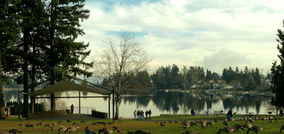
ABOVE: The 2:1 aspect ratio is becoming the standard for delivery of video content (thank you YouTube) so when you shoot in 4:3 there's a simple way to figure out your composition. Use the "Rule of Thirds" viewfinder guides (like Tick, Tack, Toe) and then compose by ignoring either the top or bottom 1/3 of the frame (I like shooting to show extra sky, in case I want to include it).
---> CREATE PRINTS IN 3:2
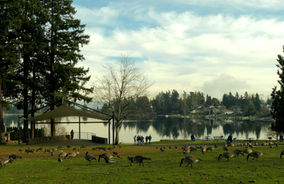
ABOVE: Yes, it might be easier to just shoot in 3:2 (because most print sizes are based on that size) but shooting in 4:3 still works pretty well, and you'll have more options for how much sky you want to include or not include.